Friday, September 2, 2011

A Few New Web Sites

Tech & Learning is a great web site that provides a lot of valuable information, resources and especially web sites.  I ventured to 10 web sites but found 3 that would be of beneficial use to a variety of teachers and subjects.

All About Adolescent Literacy
Provides a variety of tools and resources, specifically Processional Development Webcasts, related to making room for adolescent literacy, english language learners, and students getting ready for college.  This web sites also provides classroom strategies related to vocabulary, comprehension, and writing at times of before reading, during reading, and after reading.  These graphic organizers can be downloaded to be used in Pages or can be downloaded and used to view/print.  Lastly this web sites provides resources for helping struggling readers, books and author features, and the strategy library.

Poetry Foundation: Children's Poetry
Provides Articles about Children's Poetry related to essays, interviews and articles.  Also showcases Children's Video related to baby poetry, children poetry, and poetry everywhere.  A great web site that provides recommended book previews, featured authors, featured videos, featured book collections and 100s of poems related to Early Readers, Young Adults, Beginning Readers, Classics and School.

SEN Teacher: Free Teaching Resources for Special Education
Provides web links, downloads, math printables, literacy printables, and other printables for student and teacher us.  You can even customize the downloadable printables based on your needs and your students' needs.  For example you can print or download and make accessible online skeleton labels, alphabet cards, and multiplication grids to name a few.

To make accessible online for downloading you want to print the file,


then click on PDF and Save as PDF,

then save the PDF onto your computer and then upload it to Google Docs to share or to SchoolFusion for the students to download

Thursday, September 1, 2011

I don't have time to read this - Repost

Well now you can easily bookmark it, to Read Later. Instapaper, is a web site that easily allows you to create a free account to be able to add a bookmark in your bookmark bar, so once you have a web site, document, newspaper article, etc. that you do not have time to read you can easily press the bookmark button in your bookmark bar, titled "Read Later," and it will be saved to your Instapaper account for you to read later.


Included with your free Instapaper account is the ability to print, send to your kindle, or transfer in an ebook (epub) format to your iPad, iPod Touch, or iPhone.

Instapaper also has an app ($4.99) suited for your iPad, iPod Touch, or iPhone to syncrouosly keep documents located on both your laptop and your mobile device.

A free app similar to Instapaper is Read It Later Free and it works in a similar format to the Instapaper app.

Sunday, August 28, 2011

Stickies

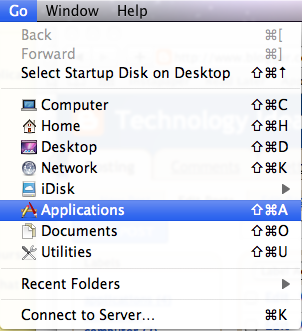
Ever need to keep track of something on the computer for a short period of time or keep track of something that you repeatedly need to do every single week, but have no where to put it.  Well now you do, with the use of Stickies.  Stickies are like digital post-it notes.  To open up the Stickies application click:

Go in the menu bar at the top of the screen and then Applications


then look alphabetically for Stickies.


Once you double click on Stickies, a blank sticky note will come up that you can type your short list or long list of reminders to.  Other options within Stickies, mainly located within File, Note and Color on the top menu bar are to add a New Note, make each note a Floating Window and/or Translucent Window, and to change the color of each note.

1 thing I do is I make sure that Stickies opens up when I login to my computer each time.  You can do this by 2-finger clicking on the Stickies icon in the dock,

 then hovering over Options and then clicking once on Open at Login.

Wednesday, August 24, 2011

Education Grants-Technology

Located in my office is a calendar displaying Educational Grants in relationship to technology.  Also click on the Education Grants-Technology title above to take you to a link talking and introducing more information related to Educational Grants.

If you are ever interested in applying for a local, state or national Education Grant in relationship to technology, please let me know so I can support you.  Of course the HDCSD technology team wants to make sure what you are applying for is compatible with the types of technology/media we currently have for teachers, staff and students, but we also want you to have the opportunity to receive different types of technology/media for your students, to help differentiate your teaching and their learning.

If you ever stop in my office for a question, check out the calendar on my tack board for some ideas.

Here is another link: http://technologygrantnews.com/grant-money-index-type.html

Monday, June 13, 2011

Technology Integration-Thoughts?

Technology Integration.  Wikipedia states that, “Technology Integration is the use of technology tools in general content areas in education in order to allow students to apply computer and technology skills to learning and problem-solving. Generally speaking, the curriculum drives the use of technology and not vice versa.”  http://en.wikipedia.org/wiki/Technology_integration

KerPoof-Web site Review

KerPoof! You probably have heard that word during a magic show, but did you know that it is also an awesome web site that teachers and students can use to create movies, drawings, pictures, stories, spell a picture, and more.  This web site can be used solely by teachers and/or students for personal use or can be used together with teachers and students for educational use.

Top 10 List-Kdg., 1st, 2nd Grade Web Sites

Top 10 Kindergarten, 1st and 2nd grade web sites

These web sites can be used for personal use, teacher use and/or student use.  Web sites that can be easily integrated into your everyday classroom curriculum.


  1. Starfall
            An awesome reading/writing web site with an enormous amount of free games/activities and now a subscription extension to it that includes math.
  2. Bookflix
            A subscription web site that most AEAs subscribe to for their schools to use that includes fiction and nonfiction stories published as both movies and an eBook format that reads that story to the students out loud.
            A great web site that provides games/activities related to the EveryDay Math curriculum.

Thursday, June 9, 2011

Dock

Did you know that the applications at the bottom and sometimes on the side of your computer screen are just short cuts?  Where they are located is called the Dock.  These are not the full applications just the short cuts and if they are deleted (poofed) off of the dock they are not lost.  Also the applications in your dock can be removed and others can be added as the dock usually starts off with a default group of applications.

Wordle

A free web site that is great for both teacher use and student use is Wordle.  Wordle allows you and/or your students to list different items related to a certain topic/theme such as Favorite Things about Eason Elementary.  When the students type out their list within the editing mode (click on Create at the top) and then they click Go it jumbles their list of words with different fonts, colors, shapes, sizes and angles of the text.  Every student could be doing the same topic/theme, but their finalized product would be published differently depending on how Wordle jumbles up their words.  Of course you and/or your students can change the layout, color, size and shape of the jumbled words after it is published and before it is printed.

DVD Player

One application that probably does not effectively get used a lot is the DVD player.  Click Go at the top of the screen and then Applications.


and then look for DVD player and double click on it.